codarch analyze
Analyses a repository and writes the cc.json snapshot.
What it analyses
Section titled “What it analyses”The walk reads each language’s extensions and parses every one with its grammar:
| Language | Extensions |
|---|---|
| TypeScript / JavaScript | .ts .tsx .mts .cts .js .jsx .mjs .cjs |
| Java | .java |
| Python | .py |
| Go | .go |
| C# | .cs |
All of them yield the file’s metrics (loc, rloc, functions, maxComplexity,
maxFunctionLength), its symbols with their complexity and its imports as edges. Rust (.rs) and the
.wasm and .node artefacts are also measured, without a tree, for the migration lens only.
Imports do not point at the same thing in every language, and the analysis respects that:
- TS/JS: modules, packages,
tsconfigaliases and workspaces. - Java: the
a/b/C.javafile, found by path suffix; it works the same for Maven, Gradle or a flat project. - Python: the
a/b.pymodule or thea/b/__init__.pypackage, and relative imports from the file’s package. - Go: the whole package —every
.goin the folder—, with thego.modprefix. - C#: the files that declare the
using’snamespace, resolved at the end of the analysis.
An import that does not resolve is counted and listed with its line; no edge is invented. A language that is not in the table is not analysed: its files do not appear on the map, and the summary says so when none are left to read.
The migration lens does not change: it is still JS/TS → Rust, so a Java, Python, Go or C# file has no state, debt or crossings.
codarch analyze [path] [options]Options
Section titled “Options”| Option | What it does |
|---|---|
-o, --out <dir> | Output folder. Defaults to <path>/.codarch. |
--ignore <pattern> | Adds an exclusion to the scope. Repeatable. |
--config <file> | YAML scope. Defaults to .codarch.yml when present. |
--no-config | Does not read the YAML scope. |
--project <name> | Project name in the snapshot. |
--no-git | Does not read churn from git history. |
--no-lint | Does not run the project’s lint. |
--history | Also saves the snapshot to .codarch-history/. |
-h, --help | Help. |
-v, --version | Version. |
Output
Section titled “Output”Writes snapshot.cc.json to the output folder and, next to it, rest.cc.json: the map of what is not code —documents, configuration and assets— in its own snapshot with its own checksum, so changing a .md does not move the code one. If it creates .codarch/ at the root, it adds .codarch/ to .gitignore (an existing folder is left alone). Prints a summary: root, both snapshot paths and sizes, lint (with its coverage), files, folders, edges, cycles, imports (external, builtins, type-only, unresolved), migration, parse cache, nested scopes and time.
If the project has lint —its config and its tool, as in codarch lint—, analyze runs it and
also writes .codarch/lint.repmod.json, signed with the checksum of the snapshot it has just written. It is
one more lens of the analysis: it does not go into cc.json —the checksum depends on the code, not on
what you have installed— and serve does not measure it again while the artifact belongs to that same
tree. --no-lint skips it.
The parse cache is left in .codarch/parse-cache.json and the list of nested scopes in .codarch/scopes.json: they are derived, they can be deleted, and they save the analysis that contains this scope from parsing again what is already parsed (codarch scopes).
The folder belongs to the product, not to your own work: when it finishes, analyze removes from
.codarch/ whatever it does not recognise —a lint.json from an earlier version, a static map, a
stray folder— and names it in a warning. Local state (preferences, caches, chains, scopes and captures)
is kept even when this pass did not write it. With --out nothing is cleaned: that folder was your
choice.
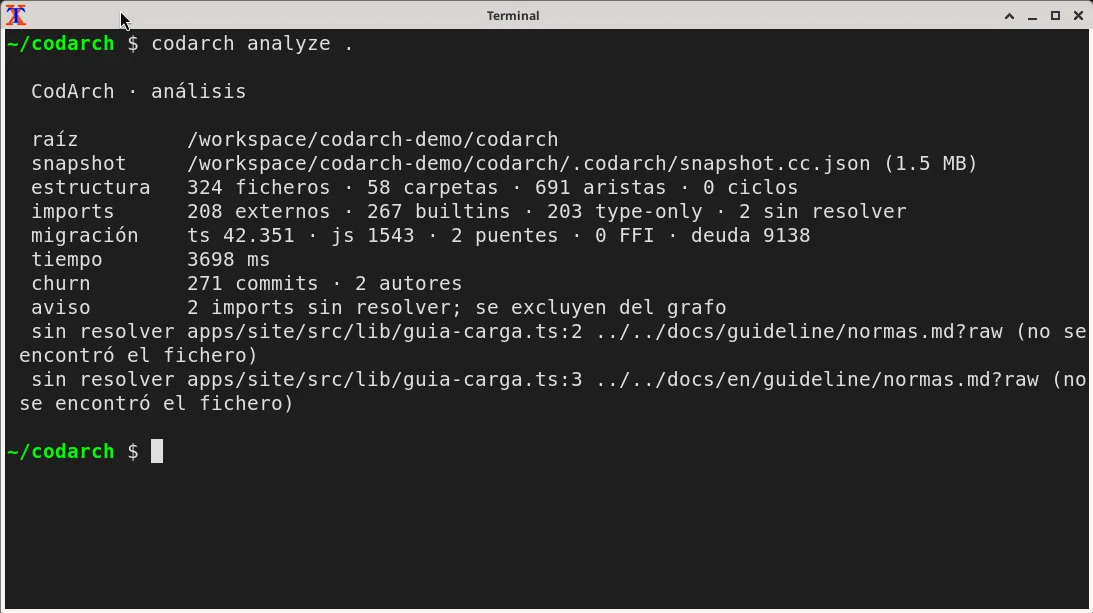
Examples
Section titled “Examples”codarch analyze .codarch analyze . -o .codarch --project "My project" --historyExit codes
Section titled “Exit codes”| Code | Meaning |
|---|---|
0 | Snapshot written. |
1 | Invalid argument or option, missing path, invalid .codarch.yml or the output could not be written. |